Setting up Mods on your Path Of Titans server
You manage your server's mods on the Mods tab of the dashboard. The server downloads the mods when it starts, and players get them automatically when they join. If you use a modded map, you also set its map name as the server's map.
Find a mod's ID
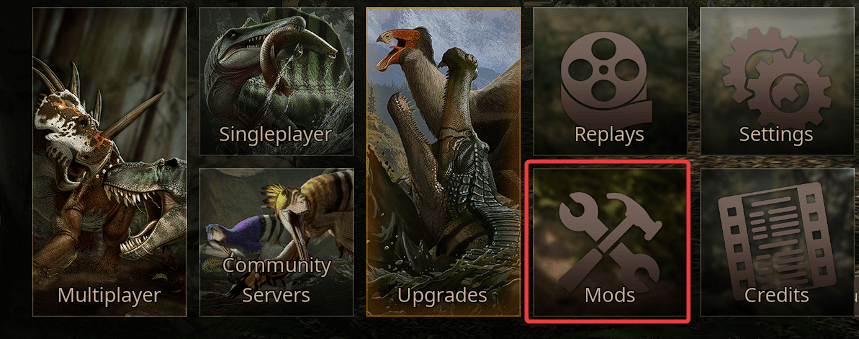
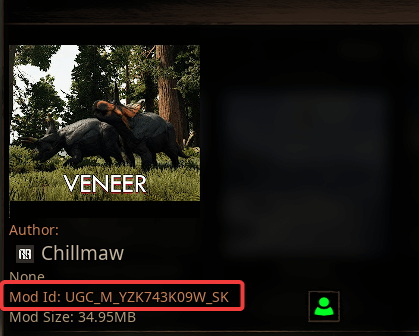
Open the mod browser in the game: select Mods in the main menu, select the mod you want and note its Mod Id. Mod IDs look like UGC_M_YZK743K09W_SK.
Add mods to your server
- Open the Fragnet dashboard, go to My servers and select your Path of Titans server.
- Stop the server (see Power controls). The mod list is saved in
GameUserSettings.ini, which the server can rewrite while it runs, so you can only change mods while it's stopped. - Select the Mods tab. If you don't see it, look under More.
- In Mod ID or link, paste the mod ID. You can also paste text or a link that contains the ID.
- Optionally, enter a Name (optional) so you know which mod it is.
- Select Add mod. Repeat for each mod you want.
- The server loads the mods in the order shown. Use the up and down arrows to change the order, or the bin icon to remove a mod.
- Select Save mods in the bar that says "The mod list has unsaved changes." (Discard throws your changes away.)
- Start the server. The mods download when it starts.
Some mods block mobile players. Check a mod's page before you add it.
Use a modded map
A map mod also needs its map name set as the server's map. Only one map can run at a time.
- Add the map mod on the Mods tab as described above, and save.
- Open the Configuration tab, select General, then the World group. You can also use the Choose the map link in the About mods card on the Mods tab.
- Under Map, select Map mod….
- Enter the map name exactly as the mod gives it, for example
TheGrimExpanse. Generally this is the same as the mod's name, but check with the mod author to be sure. Names can contain letters, digits,_and-. - Select Save in the bar at the bottom, then restart the server (see Under General).
Set the map here rather than with ServerMap in Game.ini. The server starts with the map from this setting.
If everything is set up correctly, your mods load after the restart. In the game's community server browser, select Details on your server to see the mods it runs.
Edit GameUserSettings.ini yourself
The Mods tab writes each mod as an EnabledMods line under [PathOfTitans.Mods] in PathOfTitans/Saved/Config/LinuxServer/GameUserSettings.ini, with the name you entered as a comment above it. You can also edit this file while the server is stopped, on the Configuration tab (select GameUserSettings.ini) or on the Files tab. Example with several mods:
[PathOfTitans.Mods]
;TheGrimExpanse
EnabledMods="UGC_M_DYV7XYEGX2_SK"
;German Shepard Mod (an example of mod stacking)
EnabledMods="UGC_M_DYV0XMY7GX_SK"
EnabledMods="UGC_M_YZK743K09W_SK"