For how long do I have to sign up?
The shortest billing cycle is one month. You can also pay for several months at a time, which costs less per month.
Billing cycles
When you order a server, choose a Billing cycle: Monthly, Quarterly (every 3 months) or Yearly. Longer cycles show their discount as Save followed by a percentage. The order summary shows what you pay today and what each renewal costs.
Some servers can also switch to a Semi-annual cycle (every 6 months) later. The cycles you can choose, and their prices, are shown on the server's Billing tab.
Some promo codes only work with monthly billing. If you choose a longer cycle, the order page tells you that the code isn't combined with the cycle discount.
Your server renews automatically at the end of each billing period. See How do I renew my services?.
Change your billing cycle
- Open the Fragnet dashboard, go to My servers and select your server.
- Open the Billing tab. In the Renewal card, find Billing cycle. Each option shows its price per month, and Current marks the cycle you're on now.
- Select the cycle you want. A summary shows the date of the switch and what you'll be charged then.
- Select the Switch to button to confirm, or Cancel.
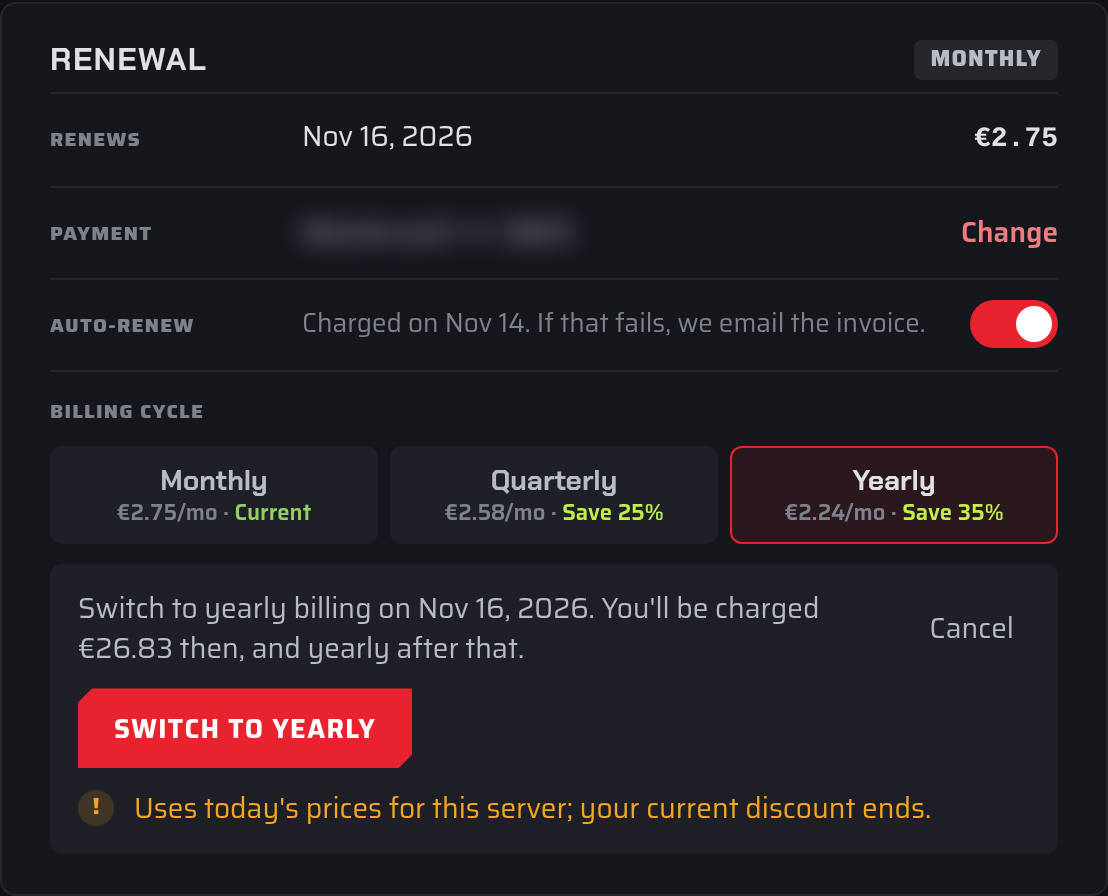
The new cycle starts at your next renewal: Saved. The new terms start at the next renewal. Until then, the card shows the scheduled switch. To undo it, select the Keep button for your current cycle.
Good to know:
- If you currently have a discount on the server, switching cycles uses today's prices and your current discount ends. The summary warns you before you confirm.
- If the renewal invoice for the next period was already created, it is cancelled and issued again at the new price.
- You can't change the billing cycle while a cancellation is pending or while the server's renewal invoice is overdue.
- Servers still paid by an old PayPal subscription can't change their billing cycle in the dashboard. Open a support ticket in the Billing category instead.