Changing basic settings of your DayZ server
Your DayZ server's main settings, such as the server name, the passwords and the message of the day, are in serverDZ.cfg. You change them on the Configuration tab in the Fragnet dashboard, where each setting has its own labelled field.
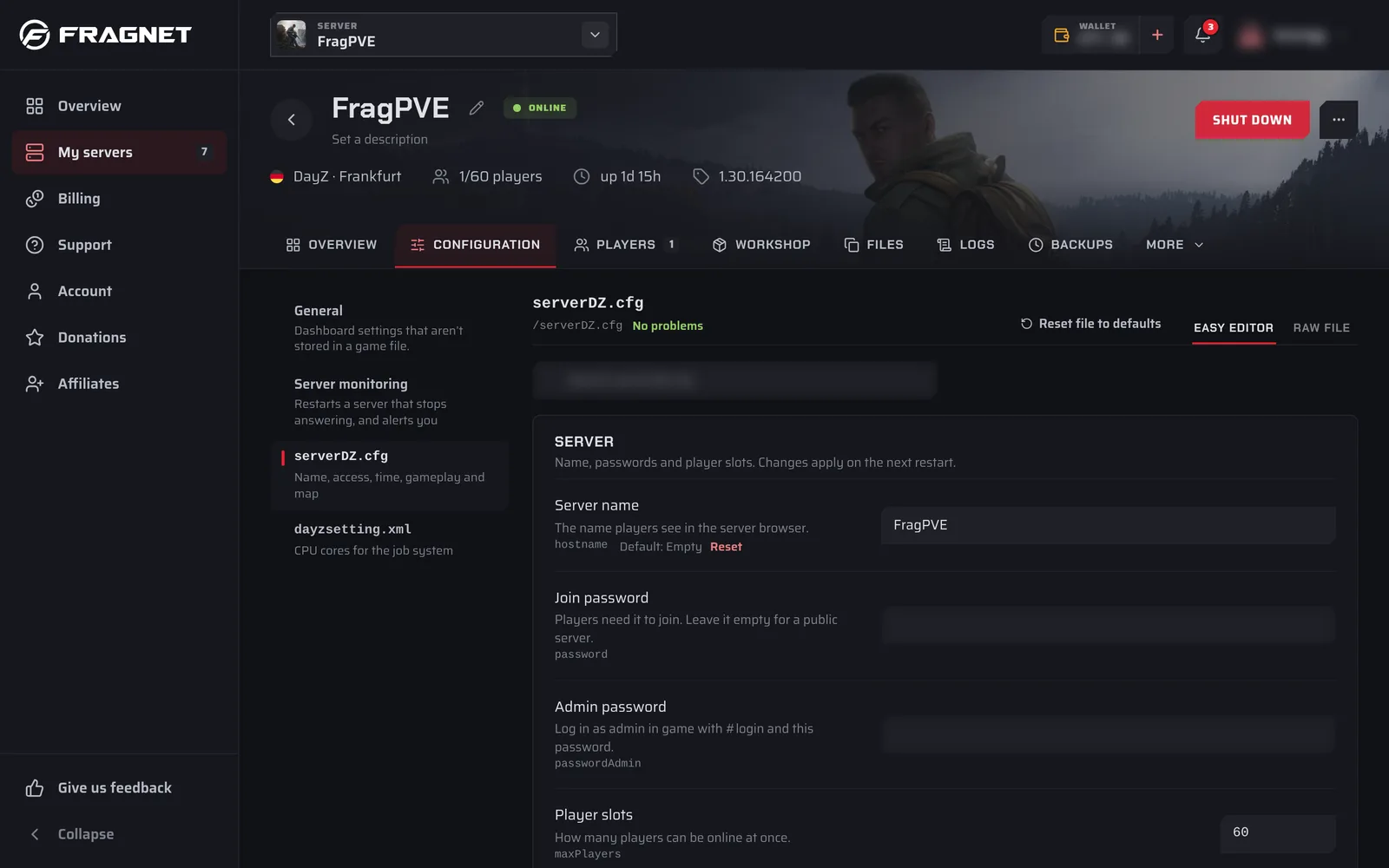
Open serverDZ.cfg
- Open the Fragnet dashboard, go to My servers and select your server.
- Select the Configuration tab.
- In the list on the left, select
serverDZ.cfg("Name, access, time, gameplay and map").
A new server that still has the default name shows a notice on the Overview tab with Name your server. That button opens the same file.
Change a setting
- Find the setting in its group, or type its name in the search box at the top (Search serverDZ.cfg).
- Change the value.
- Select Save and restart.
serverDZ.cfgcan only be written while the server is stopped, so Save and restart stops the server, saves the file and starts the server again. If the server is already stopped, Save is enough.
For more about the save bar, Review changes and the Raw file view, see Change a setting.
Settings in serverDZ.cfg
| Group | Settings |
|---|---|
| Server | Server name, Join password, Admin password, Player slots |
| Gameplay | First person only, Hide crosshair, No personal light, Night lighting, Voice chat off, Voice quality, Respawn delay, Protect bases, Protect containers, Skip the respawn choice |
| Time | Start time, Day speed, Night speed, Keep the clock across restarts |
| Access | Whitelist only, Use the ban list, Use the priority list, Logins at once, Queue size |
| Advanced | Message of the day, Message interval, Verify mod signatures, Same game version only, Use cfggameplay.json, and the admin log settings |
| Mission | Map |
Each field shows a short description and, where there is one, the default value.
Server name and passwords
- Server name is the name players see in the server browser.
- Join password: players need it to join. Leave it empty for a public server.
- Admin password: to log in as admin, type
#loginfollowed by this password in the game chat, for example#login MyAdminPassword. - Player slots is part of your plan when it shows Set by your plan. Change it on the Billing tab. See Upgrade or downgrade your server.
Settings tagged Applied at start, usually including the server name and passwords, are stored in your startup settings and written into serverDZ.cfg every time the server starts. Their labelled fields change the startup setting for you. If you edit those lines in the Raw file view instead, the dashboard warns "Replaced from your startup settings at every start", because your change would be overwritten.
Message of the day
- Message of the day: shown in the chat after players join. Put one message per line.
- Message interval: the number of seconds between the messages.
For welcome messages, repeating messages and countdowns, you can also use Server messages on the Overview tab (see Other DayZ settings).
Time
- Start time:
SystemTimefollows the real clock. Or enter a date and time asYYYY/MM/DD/HH/MM. - Day speed:
1is real time.6makes a full day last 4 hours. - Night speed: speeds up nights on top of the day speed.
4makes nights four times shorter. - Keep the clock across restarts: the clock continues where it stopped instead of going back to the start time.
Editing the file as text
Switch to Raw file to see serverDZ.cfg as text. Each setting is one line, for example:
hostname = "My DayZ Server";   // Server name
password = "";                 // Join password, empty for a public server
motd[] = {"Welcome to the server", "Join our Discord"};
motdInterval = 30;             // Seconds between messages
Settings that the easy editor doesn't describe are listed under Other settings. The full list of serverDZ.cfg settings is on the Bohemia Interactive wiki.
Other DayZ settings
Some DayZ settings live elsewhere in the dashboard:
| Setting | Where |
|---|---|
| Map | Overview tab, Map card, Change map (stop the server first). Each map keeps its own world. |
| Automatic restarts with warnings | Overview tab, Restarts and messages card, Set up restarts |
| Welcome, repeating and countdown messages | Overview tab, Restarts and messages card, Server messages |
| Whitelist, ban list and priority queue | Players tab |
| Chat limits | Configuration tab, General, Chat limits |
| BattlEye RCon password | Configuration tab, the BattlEye config BEServer_x64.cfg ("BattlEye remote console access"), RCon password. BattlEye renames this file while the server runs, so stop the server to edit it. The BattlEye RCon card on the Overview tab shows the host, port and password for RCon tools. |
| CPU cores for the job system | Configuration tab, dayzsetting.xml |
| Game updates and the Experimental branch | Steam tab |
| Restarting a server that stops answering (Windows servers) | Configuration tab, Server monitoring. See DayZ: Server monitoring alerts. |
| Loot spawns | types.xml, see Increase Item Spawns |