Wiping your DayZ server
There are two ways to wipe a DayZ server in the Fragnet dashboard. Both are in the Danger zone on the Configuration tab.
| Reset the world | Wipe server | |
|---|---|---|
| What it deletes | The current map's saved world (bases, vehicles, loot and characters), or only the characters | Every file on the server: worlds, configs, mods and player lists |
| What stays | Your settings, mods, player lists and the worlds of your other maps | Nothing. The game is installed fresh. |
| Use it for | A fresh start for your players | Starting over completely |
Deleted files can only be brought back from a backup. Make a backup first, or keep Make a backup first ticked when you reset the world.
Reset the world
- Open the Fragnet dashboard, go to My servers and select your server.
- Stop the server with Shut down at the top of the page. The game keeps writing its world while it runs. See Power controls.
- Open the Configuration tab and select General.
- Scroll down to the Danger zone and select Reset world next to Reset the world.
- In Reset the world?, choose what to delete:
- Everything: bases, vehicles, loot and characters deletes the map's whole persistence folder (usually
storage_1), for examplempmissions/dayzOffline.chernarusplus/storage_1. - Characters only: everyone starts as a fresh spawn deletes only
players.dbin that folder. Bases, vehicles and loot stay.
- Everything: bases, vehicles, loot and characters deletes the map's whole persistence folder (usually
- Leave Make a backup first ticked to back up the server before anything is deleted. The backup is called "Before world reset" followed by the mission name.
- Select Reset world.
- Start the server. The map starts fresh.
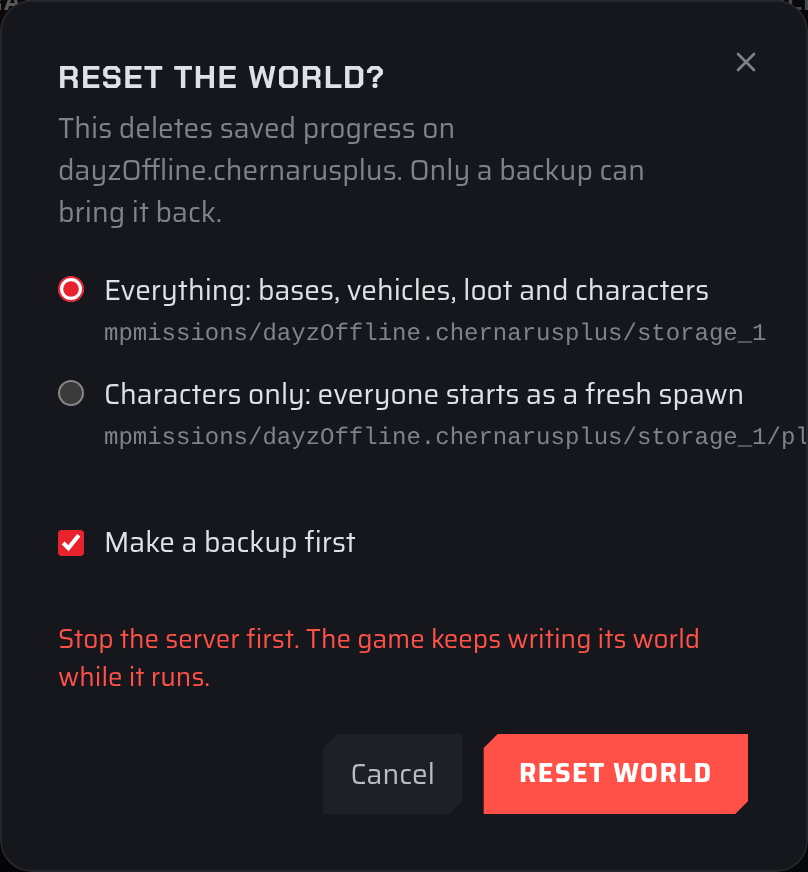
Only the map your server runs now is reset. Each map keeps its own world, so the worlds of other maps stay as they are.
If the backup can't be made or doesn't finish, nothing is deleted. This happens, for example, when you've used all the backups in your plan. Delete an old backup on the Backups tab and try again, or untick Make a backup first if you already have a recent backup.
Wipe the whole server
Wipe server in the Danger zone deletes every file on the server, including worlds, configs and mods, then installs the game fresh. You confirm it by typing the server's name. If your server doesn't show Wipe server, open a support ticket. See Danger zone: wipe the server.
After a full wipe, check your settings and the Workshop tab, and install your mods again where needed.