Become an admin on Farming Simulator 22 server
You become admin in the game by signing in with your server's in-game admin password.
Find or change the in-game admin password
- Open the Fragnet dashboard, go to My servers and select your server.
- On the Overview tab, find the Joining the farm card. Next to In-game admin password, select the eye icon to show the password, or the copy icon to copy it.
To set a different password:
- Open the Configuration tab and select the Server group.
- If the game is running, select Stop game in the notice and confirm with Stop game. The settings can only be changed while the game is stopped.
- Enter a new In-game admin password.
- Select Save in the bar at the bottom of the page.
- Select Start game in the header. The new password applies when the game starts.
info
The in-game admin password is not the password of the FS22 control panel. Only members with the Owner, Admin or Service manager role can see and change it.
Log in as admin in the game
-
Make sure the server shows Online · ready to join in the dashboard, then connect to it in the game with Multiplayer → Join Game. See Finding your Farming Simulator 22 server.
-
Once connected, go to Farm Management. You will see the Log in as Admin button.
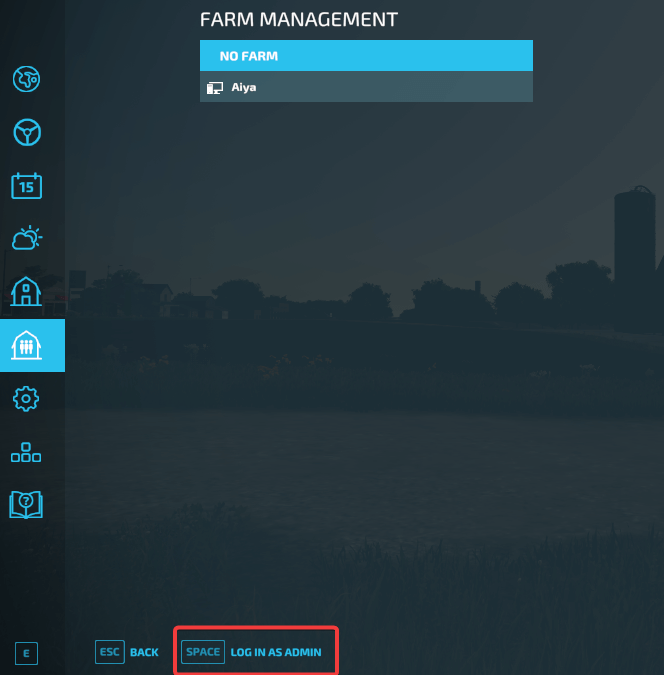
-
Select the button (or use the shortcut shown in the game). A window opens where you enter the in-game admin password from the dashboard.

-
Select Start. If the password is correct, you are now an admin.