Upload your savegame
Uploading your own savegame to the server is easy. Follow these steps and you'll have your savegame on the server in no time.
Preparing the savegame
- Make sure the server has the same mods as your savegame, installed and active. Otherwise the server may not be able to load it. See Installing mods.
- Locate your savegame on your PC. It's usually in
C:\Users\<YourUsername>\Documents\My Games\FarmingSimulator2022\savegameX, where X is your savegame slot. - Open the savegame folder. You'll see many files, such as XML, GDM or cache files.
- Select all files in that folder, right-click them and select Add to archive. Make sure the format is
.zip. Don't zip the folder itself:careerSavegame.xmlmust be at the top level of the ZIP.
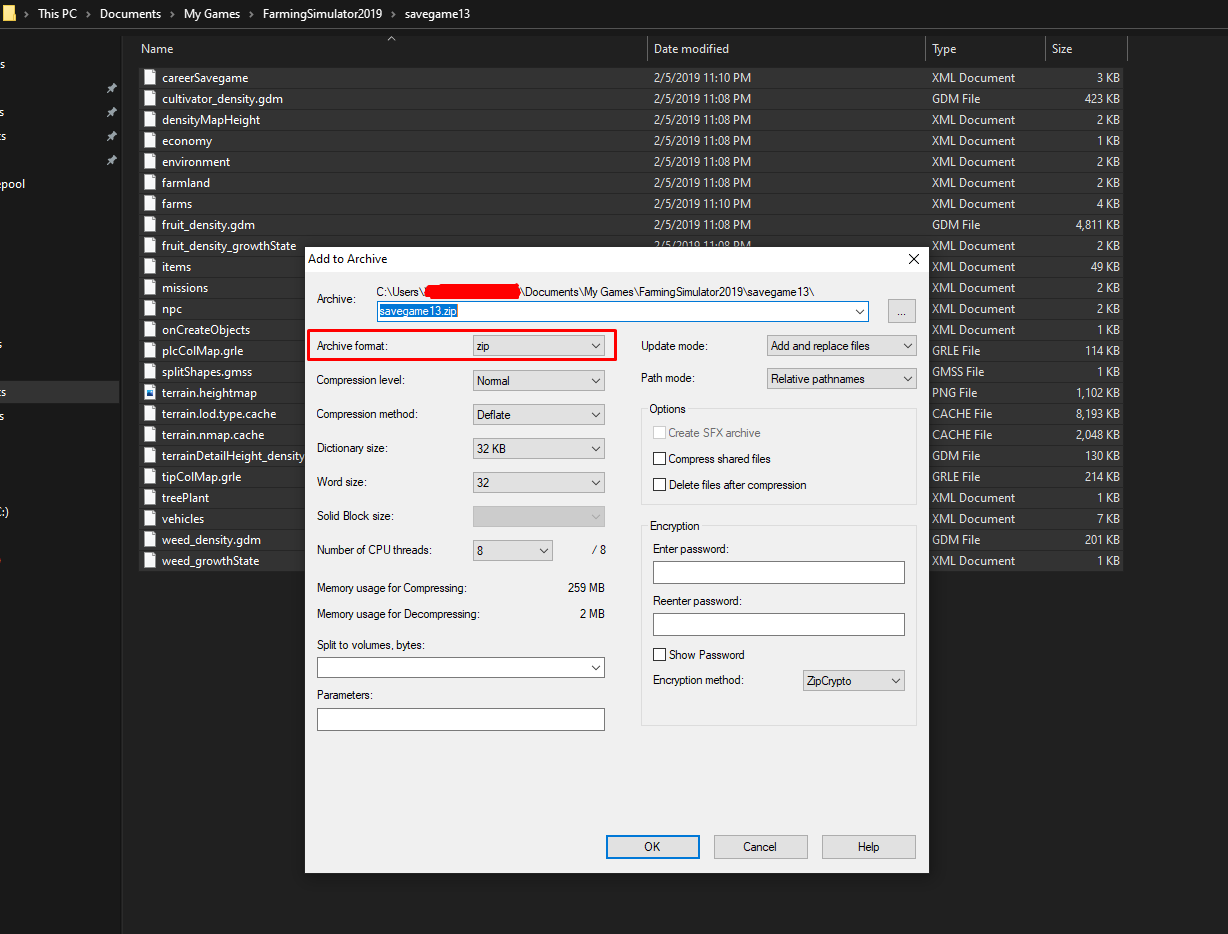
The name of the ZIP file becomes the savegame's name on the server. The ZIP can be up to 1 GB.
Uploading the savegame
The server must be running, but the game must be stopped.
- Open the Fragnet dashboard, go to My servers and select your server.
- Open the Savegames tab.
- If the game is running, select Stop game in the notice at the top and confirm with Stop game. If the server is off, select Start game in the header first, then stop the game once it's running.
- In the Upload a savegame card, choose an empty slot under Slot.
- Select Choose a savegame ZIP and pick the ZIP you created.
- Select Upload save.
The dashboard checks the savegame and sends it to the server. When it shows Uploaded, your savegame is listed in the Savegames card.
Loading the savegame
Before you start the game, make sure your new savegame is the one the server loads:
- Open the Configuration tab and select the Farm & savegame group.
- Set Savegame slot to the slot you uploaded to.
- Select Save at the bottom of the page.
- Select Start game in the header.
On the Savegames tab, the slot that loads on start is marked Loads on start.
Downloading and restoring savegames
- To keep a copy of a savegame, select Download ZIP next to it on the Savegames tab.
- The game makes automatic backups of your savegames. To go back to one, stop the game, then select Restore next to it in the Automatic backups card and confirm with Restore backup. This overwrites the slot the backup was made from.
If all 20 slots are in use, delete a savegame you don't need before uploading another. The dashboard can't delete savegames: open the FS22 control panel (on the Overview tab, select the open-in-new-tab icon next to Panel address on the FS22 control panel card), go to Savegames and select the delete icon under Manage Savegames.
If the upload is rejected, see Frequently Asked Questions.