Finding your Farming Simulator 22 server
Players find a Farming Simulator 22 server by its name in the in-game multiplayer browser.
-
Open the Fragnet dashboard, go to My servers and select your server. Check that the status next to the server name shows Online · ready to join. If it shows Game stopped or Server off, select Start game in the header and wait until the map has loaded.
-
On the Overview tab, the Joining the farm card shows the Server name and the Join password (select the eye icon to show it, or the copy icon to copy it). Note them down. The language, crossplay and other settings are on the Configuration tab, and the number of player slots is shown in the header.
-
Start the game and go to Multiplayer → Join Game.
-
Set the filters to match your server: type the server name in the name filter, and make sure the other filters (password protected, language, max. players, crossplay) don't hide it.
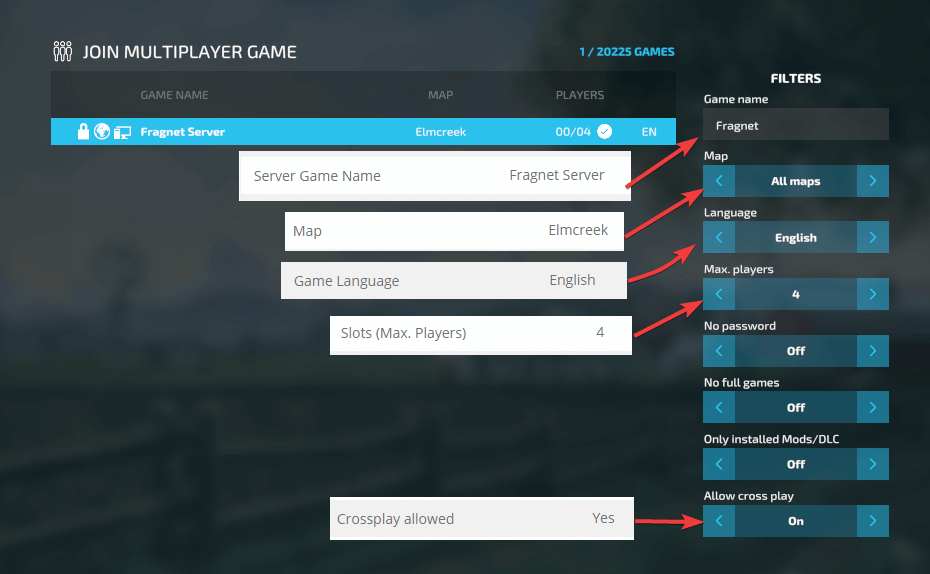
-
Select your server, join it and enter the join password.
If you have issues finding your server, check out our overview of common problems.