Assigning reserved slots on Don't Starve Together server
In Don't Starve Together, the whitelist reserves slots: players on the list always have a free slot, and other players who aren't on the list can still join with the remaining slots.
First you set the number of reserved slots in cluster.ini, then you add the players' Klei IDs to whitelist.txt. To find a Klei ID, see Get your Klei ID.
Set the number of reserved slots
-
Open the Fragnet dashboard, go to My servers and select your Don't Starve Together server.
-
Select the Files tab, open the folder
DoNotStarveTogether/config/serverand selectcluster.inito open it in the editor (see Edit a file). -
In the
[NETWORK]section, add this line and replacenumberwith the number of reserved slots you want:whitelist_slots = numberIn this example, there are 5 reserved slots:
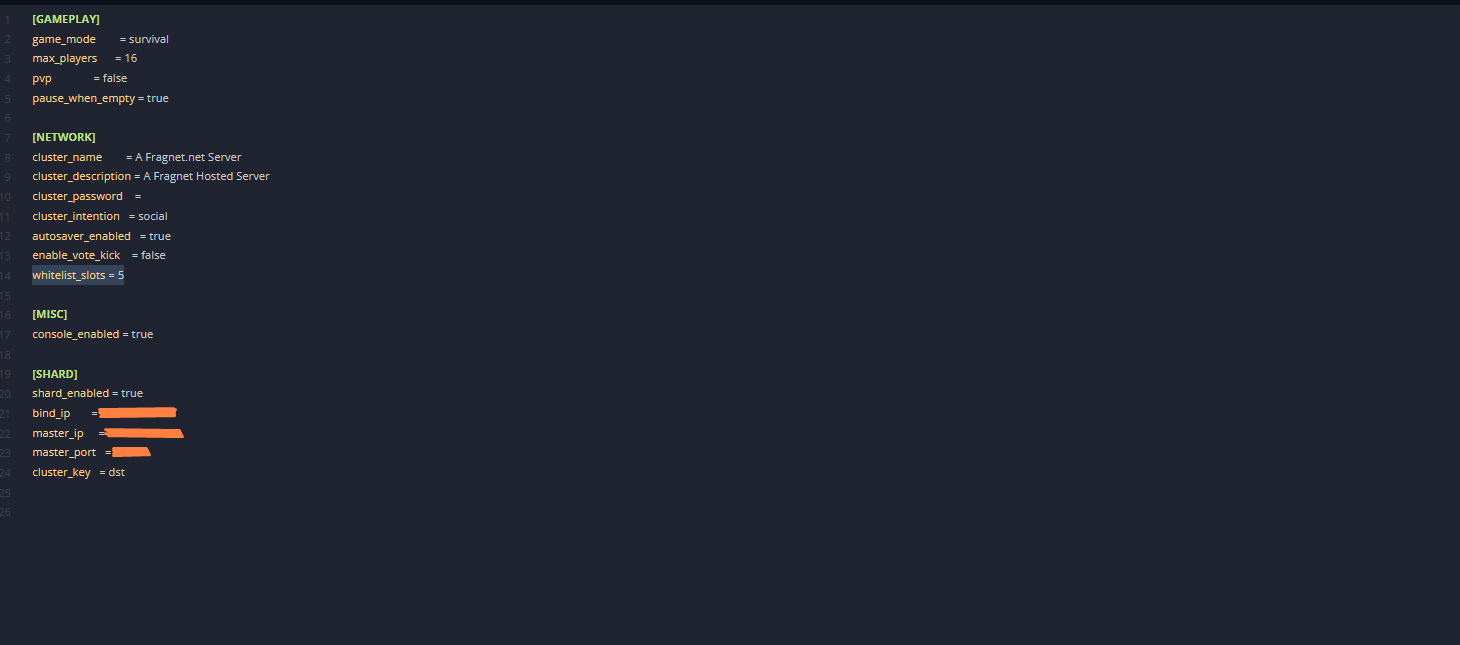
-
Select Save file.
Create the whitelist
- On the Files tab, open the folder
DoNotStarveTogether/config/server. - If
whitelist.txtis already there, select it to open it. Otherwise select New file, enterwhitelist.txtas the name and select Create (see Create a file or folder). The name must be exactlywhitelist.txt. - Enter the Klei IDs of the players who get a reserved slot, one per line.
- Select Save file.
- Restart the server (see Power controls).
The players on the whitelist now have priority over other players connecting.